Choose a version
Select the Dynamic Offer version to preview.
Helping growth teams trust Dynamic Offers by showing how their offers will behave before they go live. Delivered in a single sprint.
increase in Dynamic Offers adoption
uplift in new-business conversion
increase in sales-rep confidence in positioning Dynamic Offers
Following the launch and US demonstration of Dynamic Offers, the next challenge was helping customers feel comfortable using it. Teams could configure contextual offers, but they needed to see what those rules would return before relying on them.
Offers Preview gave them a way to enter visitor criteria, choose a site and environment, and inspect the result ahead of deployment. The design needed to make both the outcome and the boundaries of the preview clear.
Product design
Preview configuration, testing and iteration
One sprint
A focused follow-on to Dynamic Offers
Confidence before experimentation
Understand results without changing live sites
The preview had to answer both questions. Showing an attractive offer alone would not explain how it related to the customer’s own site or whether running it could affect production.
Select the Dynamic Offer version to preview.
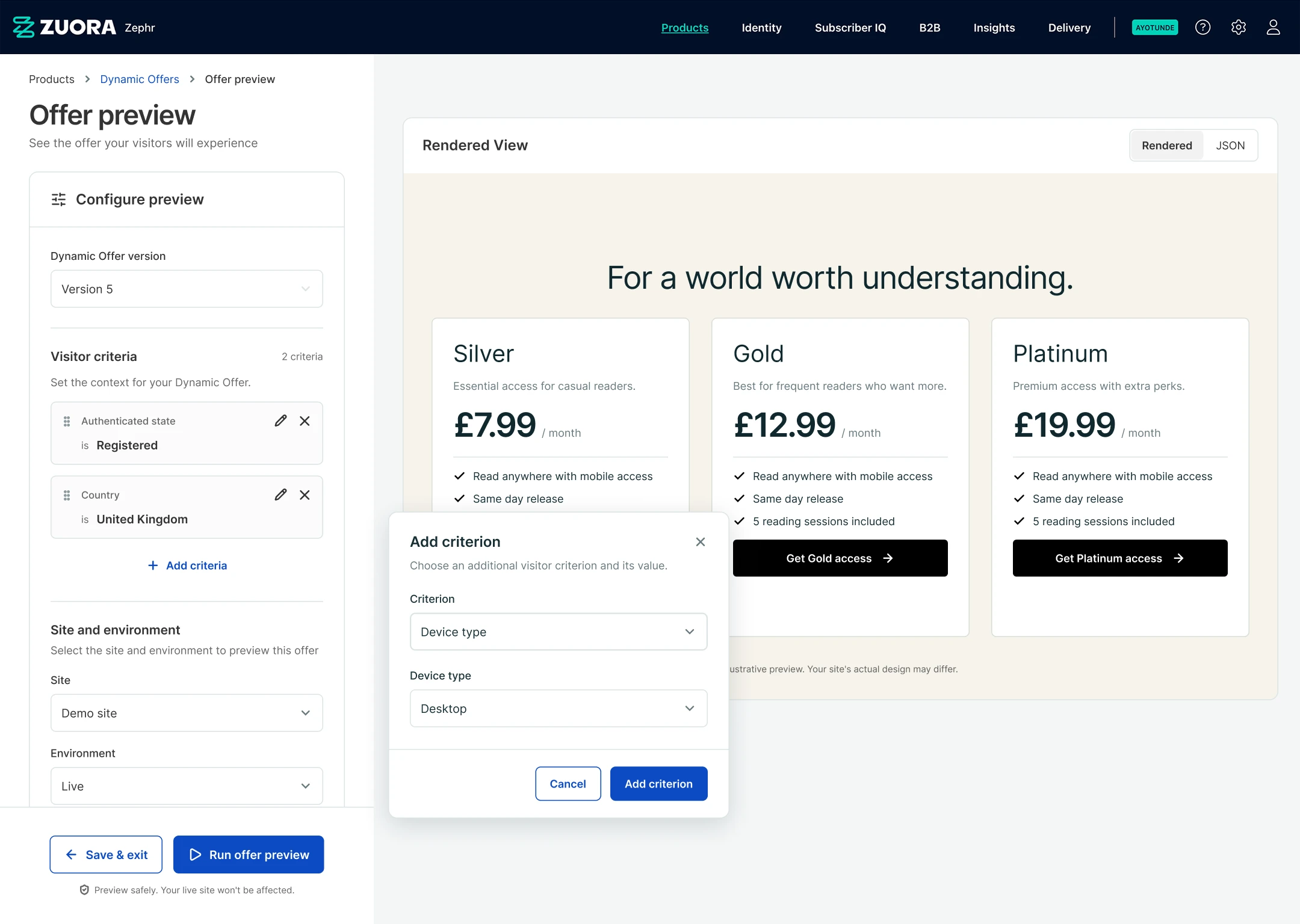
Add criteria such as authentication state, country or device type.
Choose the site and environment to run against.
Review the illustrative offer or switch to the JSON response.
The criterion and its value are configured together, letting teams model the visitor context they want to test.
That question kept recurring in customer testing. The rendered offer looked like a site experience, but it was an illustration. Customers also needed reassurance that previewing against an environment would not change their real site.
The first iteration displayed the offer without explaining that its presentation was illustrative or that the preview was safe to run.
The final design adds an illustrative-preview note beneath the offer and a live-site safety message beside the run action.
Customers questioned whether the rendered cards represented their actual UI. Uncertainty about the preview could undermine the confidence it was intended to create.
“Illustrative preview. Your site’s actual design may differ.” sits with the result. “Preview safely. Your live site won’t be affected.” sits with the run action.
Criteria are evaluated in sequence, so changing their order can change the result. I added draggable handles so teams could rearrange the criteria and test the order they intended.
The handle makes reordering visible beside each criterion, alongside edit and remove controls.
Visible in the revised screens: drag handles precede “Authenticated state” and “Country”; the first iteration had no handles.
A rendered offer makes the result easy to understand, but it cannot show every entry in the JSON payload. Billing information and other fields may be useful to customers even when they are not represented in the illustrative cards.
An illustrative presentation of the returned plans, prices, features and calls to action.
The payload exposes the returned fields so customers can inspect the data and decide what to surface on their own sites.
I chose an illustrative rendered view for quick understanding and a JSON view for inspecting the complete returned data. Customers retain control over what they display in their own implementation.
increase in Dynamic Offers adoption
uplift in new-business conversion
increase in sales-rep confidence in positioning Dynamic Offers
Users were more comfortable experimenting because they could inspect results ahead of time. The preview gave reps a clearer way to demonstrate what the product could do and help prospective customers understand the result.
This single-sprint delivery made the outcome visible and the conditions of the experiment understandable. Customer testing showed where the interface still needed to explain itself.
Explain live-site safety beside the run action and the illustrative nature of the result beside the preview.
When sequence affects the result, make ordering visible and editable within the test setup.
Offer a readable summary and access to the underlying response so customers can inspect what matters to their implementation.
I’m always open to interesting conversations—about design or what comes next.