Choose
Find plants suited to a home, light, and experience level.
Designing and building a mobile MVP that helps houseplant owners identify plants, track care routines, receive reminders, and ask an AI assistant for plant-specific guidance.
from concept to a working MVP
main destinations in the app
mobile platforms: iOS and Android
I own around 13 indoor plants. Keeping track of watering schedules, sunlight needs, and plant-specific issues became the starting point for LFFY: a calm companion that helps owners decide what to do next.
I owned product structure, interaction design, the visual system, AI feature definition, and the build process from Figma to working app.
Sole designer & AI-assisted builder
Product structure through implementation
iOS and Android
React Native, Expo, Supabase, OpenAI
Working MVP in under 3 days
Launch-preparation work remains
Find plants suited to a home, light, and experience level.
Track care tasks and use reminders that feel useful.
Get guidance tied to the selected plant.
Keep the app focused on actions rather than dense information.
I defined colours, typography, spacing, cards, buttons, and reusable screen patterns. Figma references and explicit rules helped the AI-assisted implementation stay aligned as the product grew.
My Plants
Your care routine
Peace Lily
A little care, every day.
Find the right light for your plant.
Next watering · Tomorrow
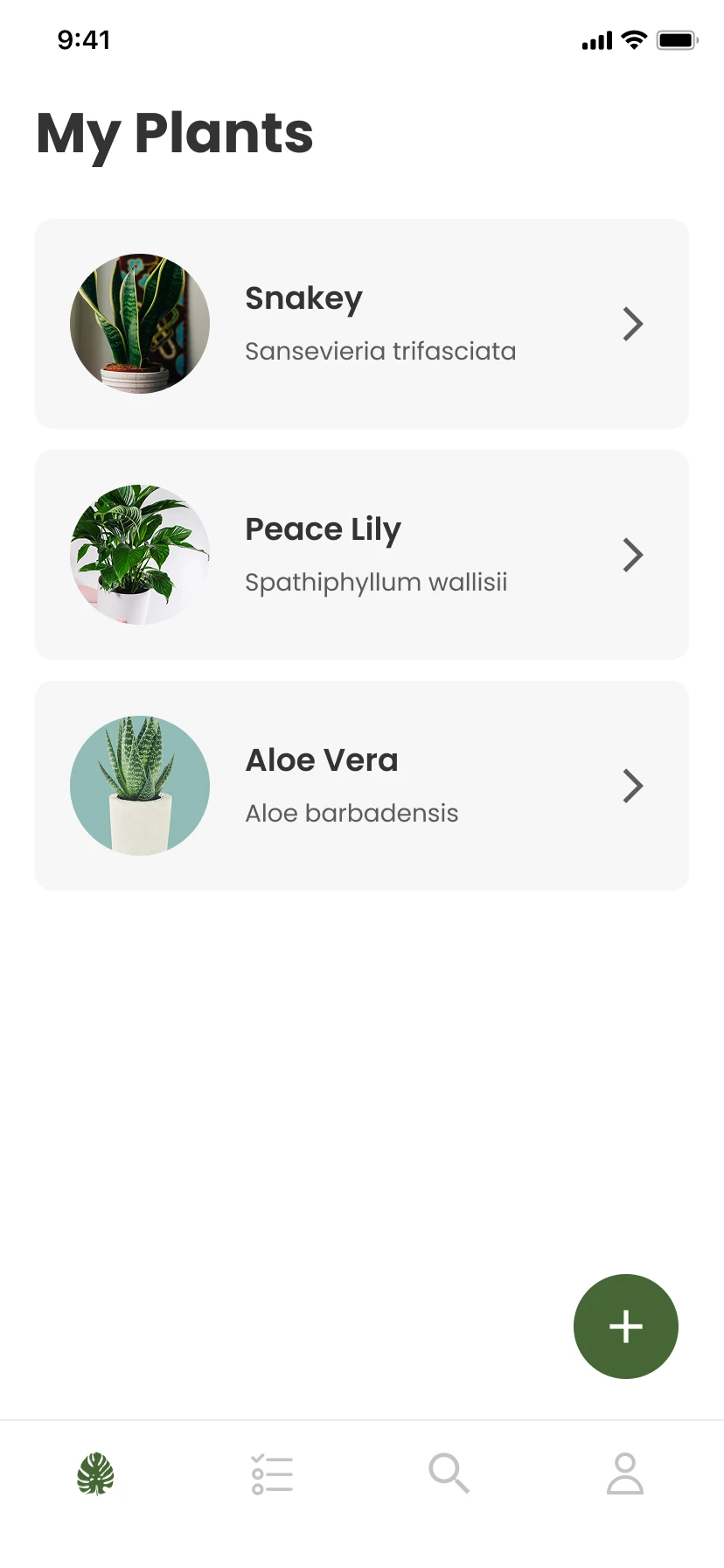
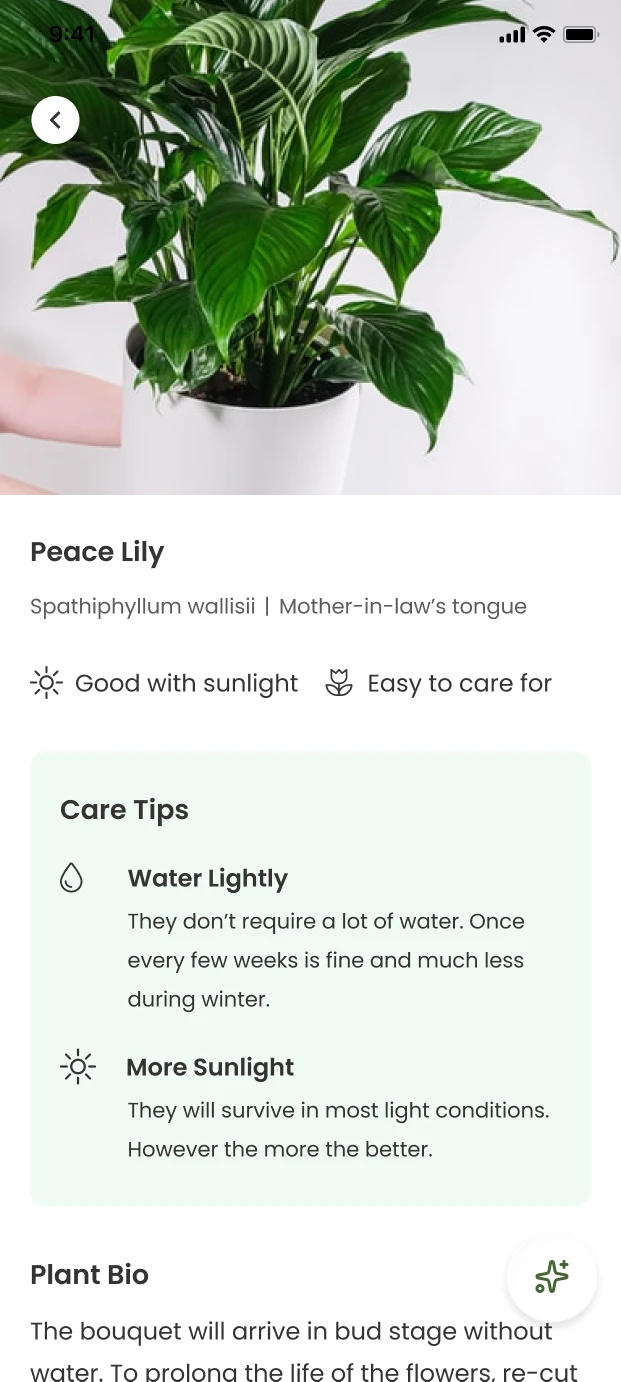
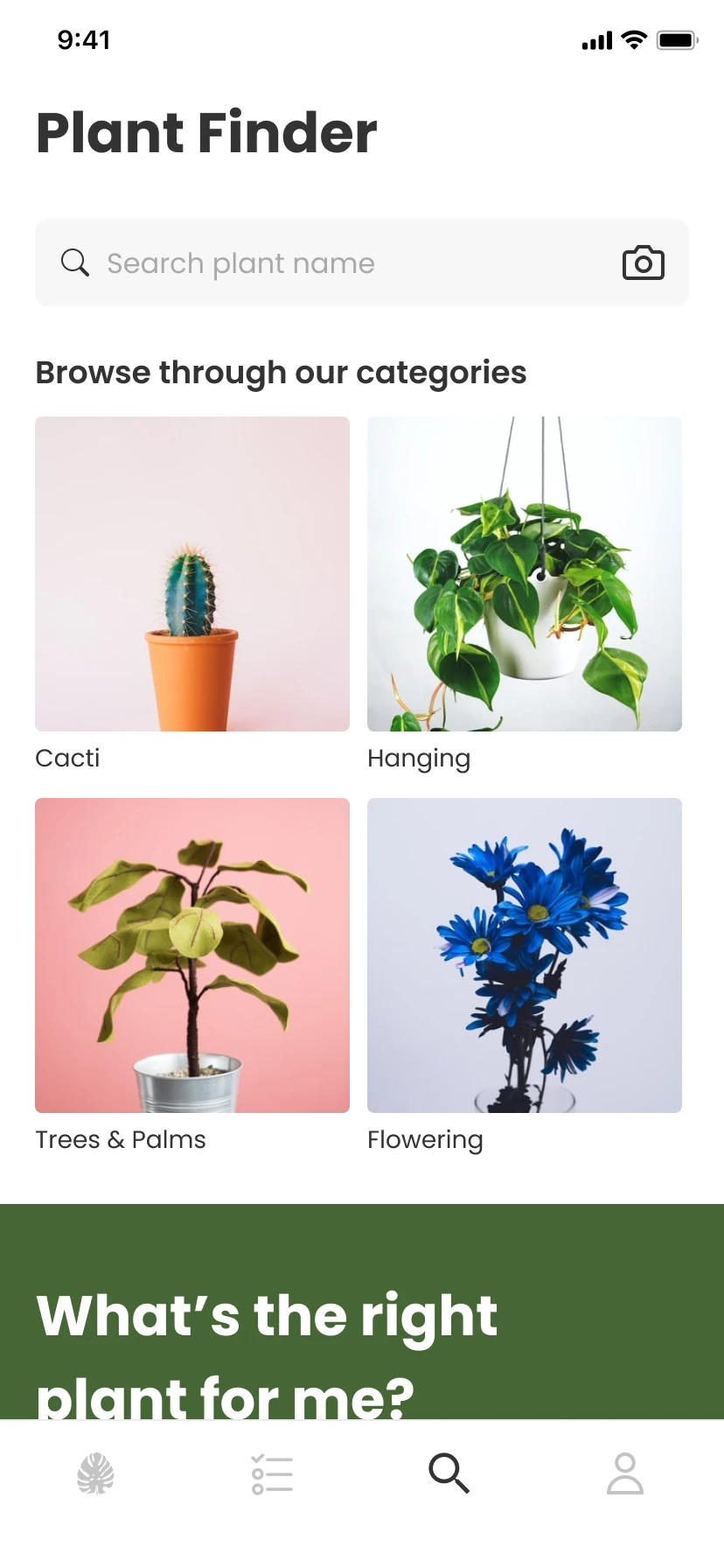
I structured the app in Figma around My Plants, Reminders, Finder, and Profile. These designs defined the app’s structure and screen patterns, and I gave them to the AI agent as references for implementation. Each flow had a clear home: plant discovery, care setup, tracking, authentication, and AI chat.
A personal collection and access to each plant profile.
Pending and completed tasks, organised around action.
Search, categories, and recommendation entry points.
Care guidance and context for the selected plant.
Turn Figma screens into a navigable app, align the tab structure, and refine implementation with explicit visual QA.
Save plants and completed tasks, generate care reminders, and preserve progress between sessions.
Connect Supabase and adapt sign-up, verification, reset, and mobile deep links to the platform’s behaviour.
Use vision for identification and plant data for care chat. Distinguish unavailable AI, API failures, and local fallback states.
Identify server-side API handling, TypeScript cleanup, onboarding polish, and navigation fixes before public release.
Selected excerpts from my build log show how I made design requirements explicit, checked the agent’s interpretation, and redirected the build when real-device testing exposed a problem.
3. Primary text colour is #333333
4. Secondary text colour is #5c5c5c
5. Typography font is Poppins and styles below
6. Update plant card to align with [Figma node]
7. Spacing between each plant card is 12px
The agent restated a 414 × 84px tab bar, a light-grey divider, and approximately 30–34px of bottom padding. It also described an 18px plant nickname and a 14px italic scientific name. I reviewed that interpretation before approving or correcting the implementation.
THE ISSUEGenerated screens needed tighter alignment with the intended visual system.
MY RESPONSEI supplied colour values, Poppins type styles, tab-bar padding, plant-card details, spacing, and Figma references, then checked the agent’s interpretation.
Expo Go Supported SDK is 54. Terminal says this version is not supported.
The scaffolded Expo SDK was newer than the version supported by the installed Expo Go app.
MY RESPONSEI redirected debugging toward device compatibility, moved to SDK 54-compatible versions, and worked through the resulting type and icon changes.
Confirmation email links opened localhost:3000 instead of the app.
The design assumed an email code, while Supabase sent confirmation links. Some links opened localhost instead of returning to the app.
MY RESPONSEI adapted the flow around email confirmation, password reset, and mobile deep links rather than forcing the original assumption.
An insufficient-quota error was being obscured by keyword-based local responses.
MY RESPONSEI made real AI, no-key mode, API failure, and local fallback distinguishable. I also reduced image size, response length, and chat history, and routed simple questions around the API.
Onboard, browse plants, add to a collection, set up care, receive reminders, complete tasks, and ask plant-specific questions.
Authentication, password reset, settings, and Supabase-backed persistence support the MVP.
Identification and care chat account for real responses, local fallback behaviour, and failure states.
Before public release, my largest priority is moving OpenAI calls behind a Supabase Edge Function, followed by type cleanup, onboarding polish, and navigation fixes.
Four recordings show the core flows on a real device.
A short setup asks about the plant’s environment, then connects the collection to care reminders.
The recommendation quiz asks about the owner’s conditions and preferences, including pets and children, before suggesting suitable plants.
Camera-based identification gives plant discovery a direct entry point. The recording shows the capture and identification flow in the working MVP.
The care assistant opens from a plant profile, so the conversation can stay tied to that plant rather than starting from a blank chat.
The product model and design system made the AI-assisted build easier to direct. Real-device testing revealed issues that static review could not.
Give each flow a clear home before asking an agent to implement screens.
Use tokens, component rules, spacing, and interaction notes as a contract for generated code.
Validate on a real device and make authentication, API failure, and fallback states understandable.
This case study describes a working MVP, not a publicly released app.
I’m always open to interesting conversations—about design or what comes next.