Helping designers develop AI coding skills and contribute customer-facing components alongside engineering, expanding their ownership into implementation.
In 2025, I needed an end-to-end prototype for user testing that went beyond what Figma could support. I used v0 to build a working experience, then shared the approach through a UX showcase.
That prototype made the opportunity tangible: AI-assisted coding could help designers test richer interactions and carry their design intent further into implementation.
MY CONTRIBUTION
Design leadership Demonstration, learning, and collaboration
TEAM CONTRIBUTION
Domain designer + engineering Component implementation and code review
EVIDENCE
Customer-facing components Used in a live Experiences Builder implementation
THE STARTING POINT / V0 PROTOTYPE
Make the interaction testable.
The working prototype explored a guided review of product attributes. This short recording shows editable values, a “same for all products” control, progress between questions, and keyboard shortcuts—behaviour the team could try rather than interpret from static screens.
PROTOTYPE RECORDING · 0:13
Reviewing suggested attribute values and moving through the guided flow.
02 / ENABLE THE TEAM
Turn enthusiasm into shared capability.
Designers had different technical backgrounds. Some knew HTML, CSS, and JavaScript but had limited experience contributing professional code. Interest alone was not enough; they needed supported practice.
01
Demonstrate
Show a working prototype and explain how it was built.
02
Support practice
Share resources, training modules, critiques, and showcases.
03
Learn together
Bring attempts into team sessions and discuss what worked.
04
Apply to delivery
Connect developing skills to real demand for ready-made components.
A REAL PRODUCT NEED
More components. Limited engineering capacity.
Experiences Builder customers wanted more ready-made options. A designer in the domain had developed the skills to build components with AI and submit pull requests, creating an opportunity for design to contribute directly.
03 / SHARED DELIVERY
Extend ownership. Keep review collaborative.
The workflow let designers build and review components with the design team, then submit pull requests for engineering review before publication. Existing design quality expectations continued to apply.
My contribution was establishing the learning and collaboration that enabled this work. The domain designer owned component implementation; engineers reviewed the code.
01
Build
Use AI-assisted coding to implement the component.
02
Review design
Test behaviour and refine details within the design team.
03
Submit a PR
Bring working code into the delivery workflow.
04
Review engineering
Work through code review before library publication.
Companies manage their products, plans, prices, and entitlements in the internal product catalogue. The components being built are customer-facing: they reference that catalogue data and present it as pricing cards or a plan-comparison table, helping customers evaluate and choose a plan.
The internal catalogue behind the components
The internal platform is where companies maintain plan entitlements and monthly and annual rate charges. The customer-facing components reference this data to display each plan’s pricing and features.
02 / BUILD AND CONFIGURE
Make the component reusable.
The clean editor views show two distinct presentation patterns. Pricing cards foreground plan selection; the comparison table supports feature-by-feature evaluation. Exposed settings let the builder adjust the presentation without rebuilding the component.
Pricing cards · component settings
Controls include billing frequency, savings and popularity badges, currency, and visible content.
Plan comparison · component settings
The table exposes catalogue selection, labels, annual pricing, and footer and CTA settings.
03 / ITERATE WITH AI
Ask for a change. Inspect the result.
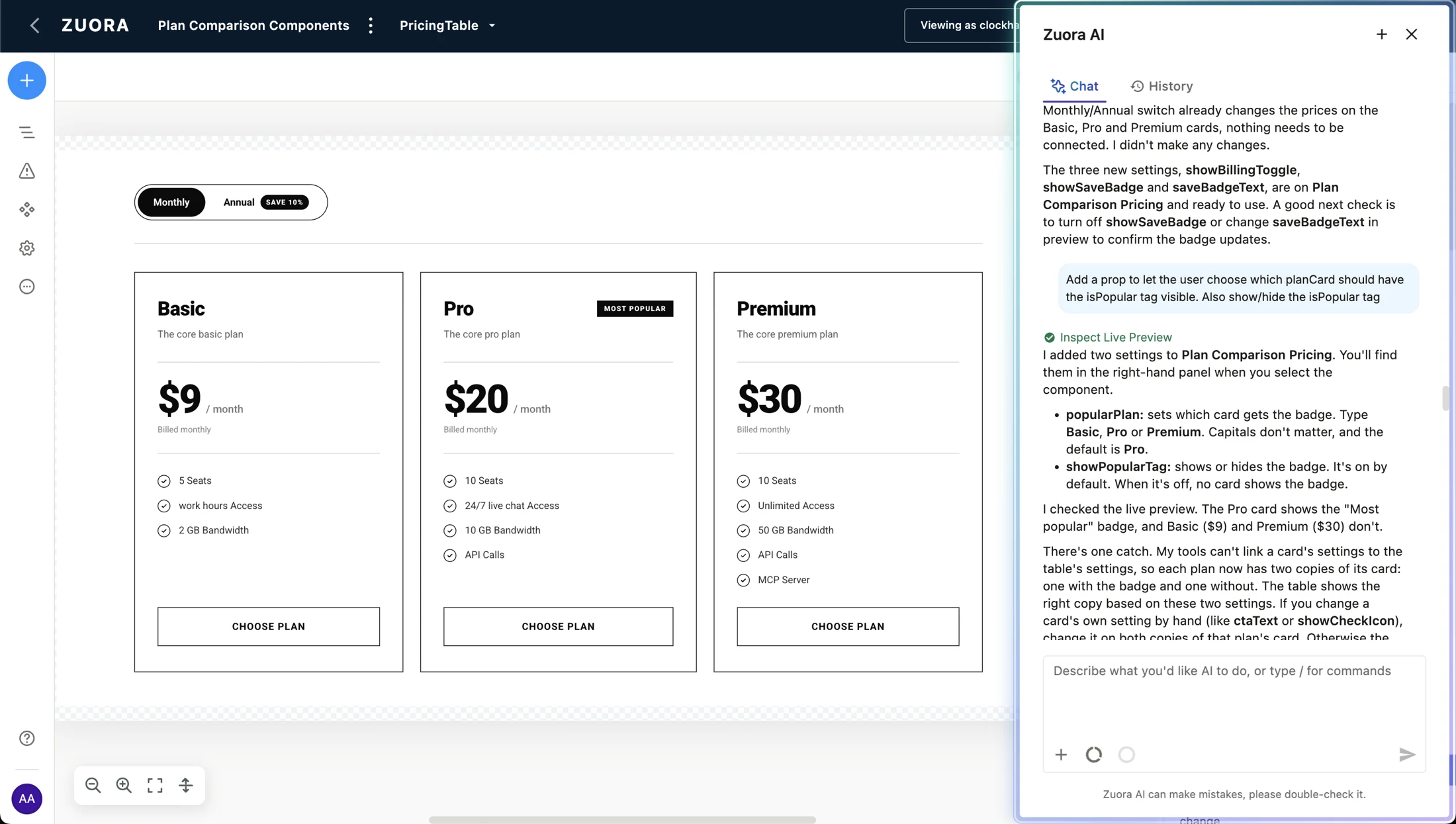
The agent-visible views make the implementation work concrete: connecting catalogue data, adjusting component behaviour, and checking the live preview. They also show why review matters—the agent can describe a successful data connection while still reporting that the visible output needs further work.
Make plan badges configurable
The agent describes settings for choosing the highlighted plan and showing or hiding its badge. It also flags duplicated card variants that need care when edited.
Order features using catalogue data
The agent describes ordering shared features first and recalculating that order when the catalogue loads. The preview makes the result available for inspection.
Check the connection and the rendered UI
This intermediate build captures catalogue-query work and an explicit report of a remaining rendering issue. A tool completion alone was not enough to establish that the component was finished.
THE CONSISTENCY LESSON
The design system had to enter the process earlier.
Generating a functioning component was easier than generating one that used established components correctly. Designers needed to inspect the output, identify inconsistencies, and refine implementation alongside their prompting skills.
04 / OUTCOMES & LEARNING
From shared learning to customer-facing work.
Working components
Design contributions now extend into implementation and pull requests. Pricing and plan-comparison components bring catalogue product information, prices, and entitlements into customer-facing UI.
Applied learning
Designer-built components are used in a live customer implementation of Experiences Builder.
Less translation
Designers can refine interaction and presentation details while building, reducing some subsequent UX correction cycles.
Additional capacity
Design contributions helped address demand for ready-made components in the library.
These are observed changes in ownership and collaboration. The source does not quantify delivery speed or defect reduction.
WHAT I TOOK FORWARD
Turn experimentation into shared capability.
The value came from connecting supported learning to a real customer need, with design and engineering working together.
Make the opportunity concrete
Start with a working prototype that others can see, question, and learn from.
Support practice
Use showcases, critiques, resources, and training to help designers build confidence.
Make collaboration repeatable
Agree responsibilities, shared goals, code review, and support for released components before scaling.